วิธีการซื้อแพ็กเกจสแตนดาร์ด เพื่อรับชมเนื้อหากีฬาสำหรับลูกค้า AIS
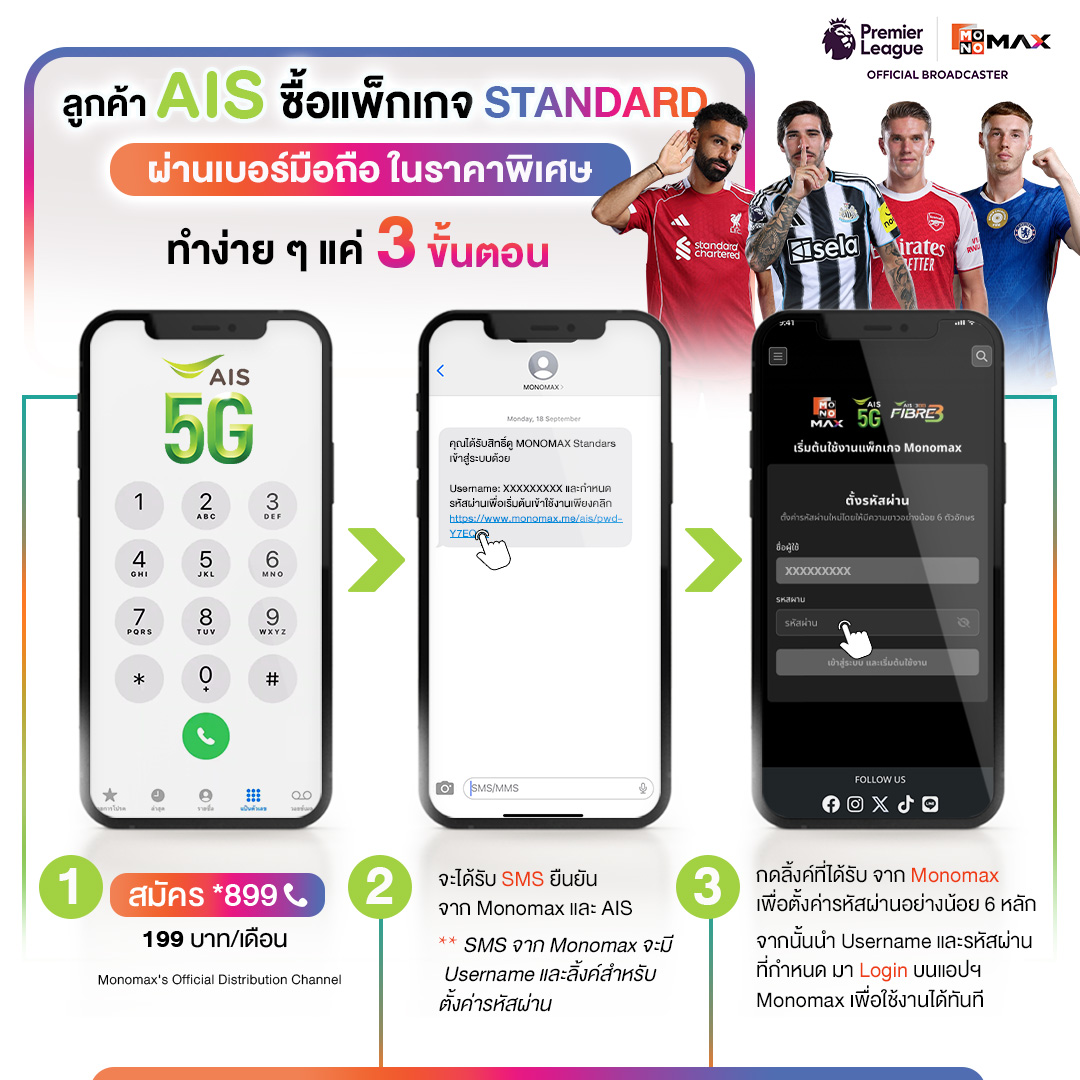
1.วิธีการซื้อแพ็กเกจสแตนดาร์ด สำหรับลูกค้า AIS ชำระผ่านเบอร์มือถือ
1.1 กดสมัคร *899 (199 บาท/เดือน)
1.2 จะได้รับ SMS ยืนยันจาก Monomax และ AIS โดย SMS จาก Monomax จะมี Username และลิ้งค์สำหรับตั้งค่ารหัสผ่าน
1.3 กดลิ้งค์ที่ได้รับ จาก Monomax เพื่อตั้งค่ารหัสผ่านอย่างน้อย 6 หลัก
จากนั้นนำ Username และรหัสผ่านที่กำหนด มา Login บนแอปพลิเคชัน Monomax เพื่อใช้งานได้ทันที
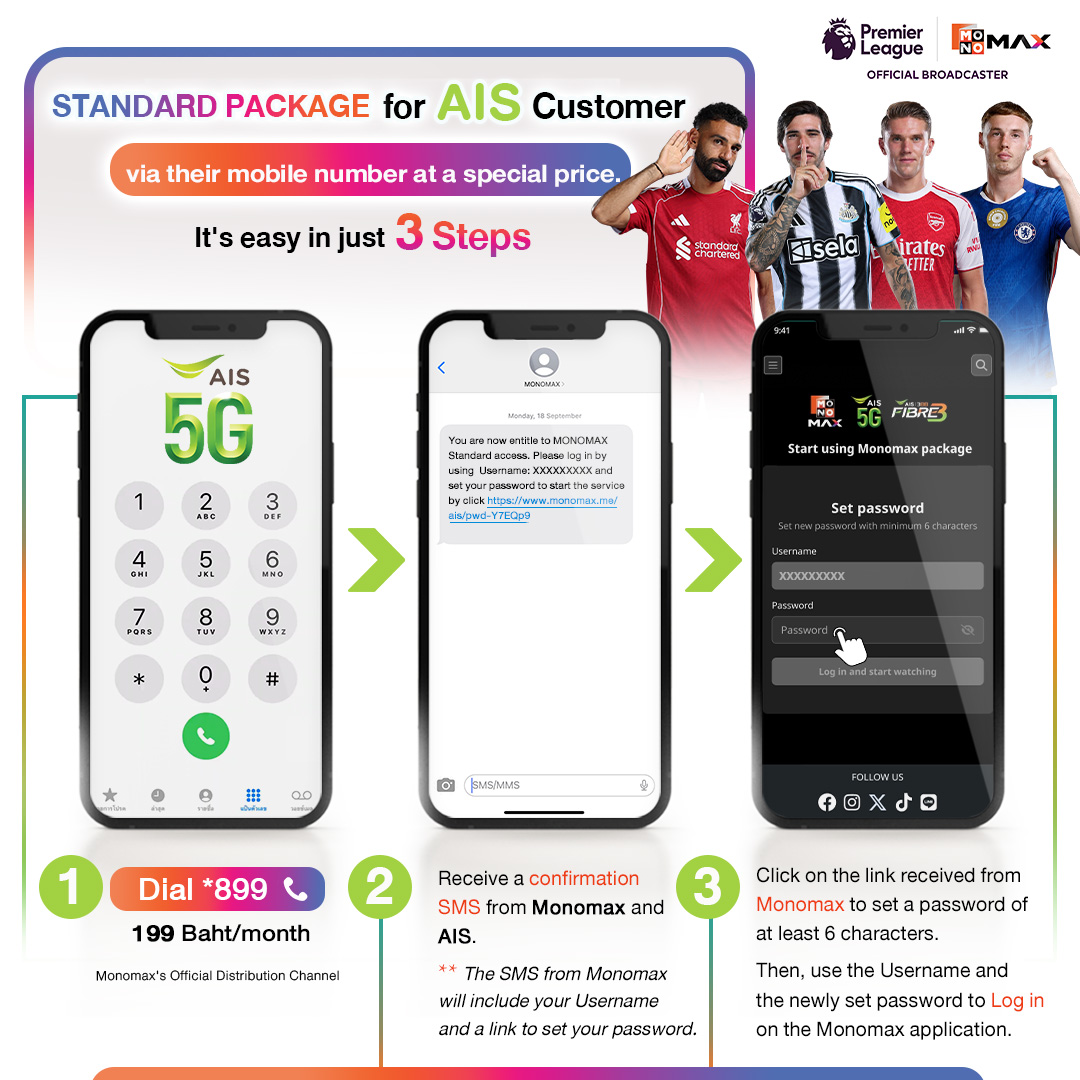
1.How to purchase a standard package for AIS customers paying through mobile number
1.1 Press to subscribe *899 (199 baht/month)
1.2 You will receive a confirmation SMS from Monomax and AIS, and the SMS from Monomax will contain a Username and a link to set your password
1.3 Click on the link received from Monomax to set a password of at least 6 characters
Then use the Username and password you set to log in to the Monomax application for immediate use
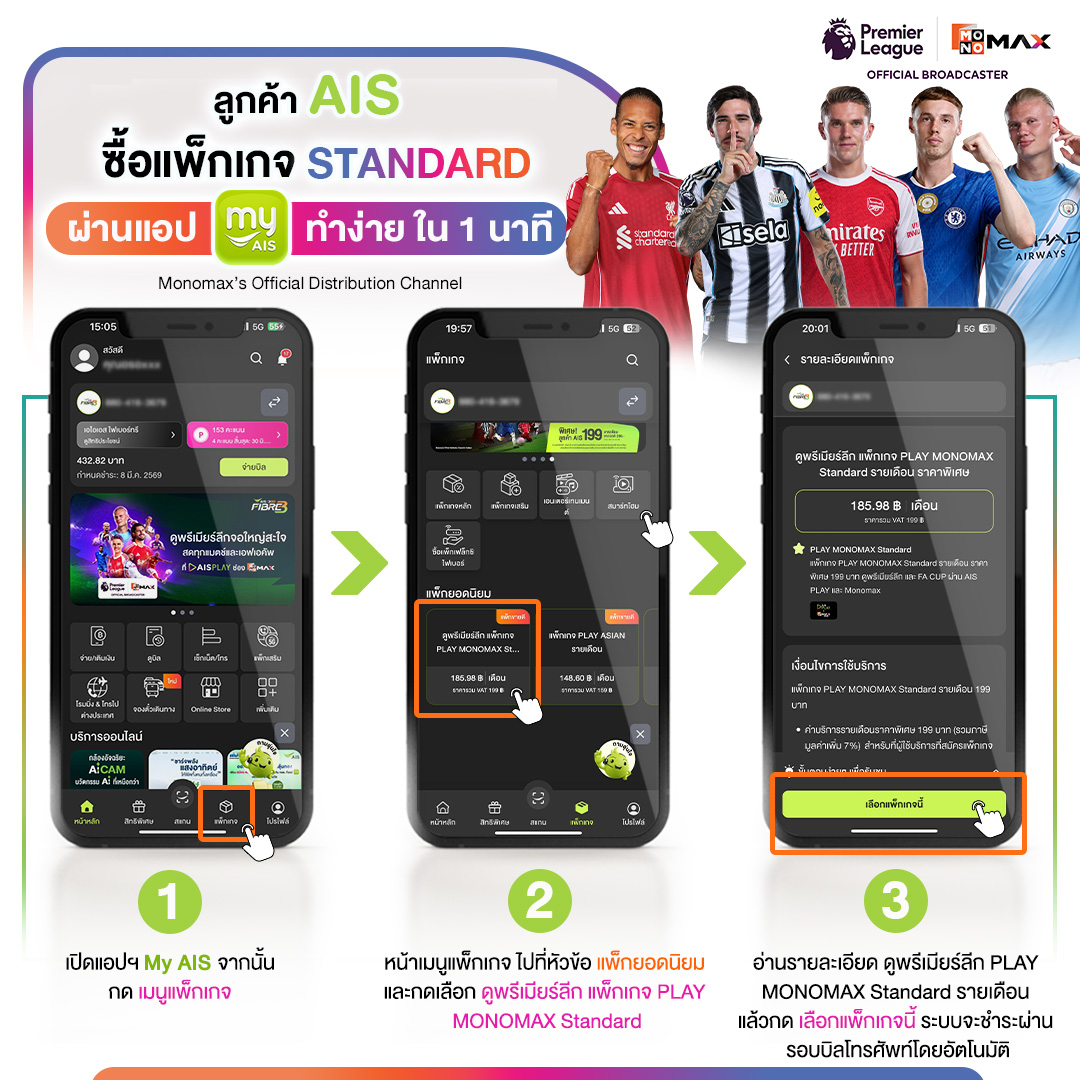
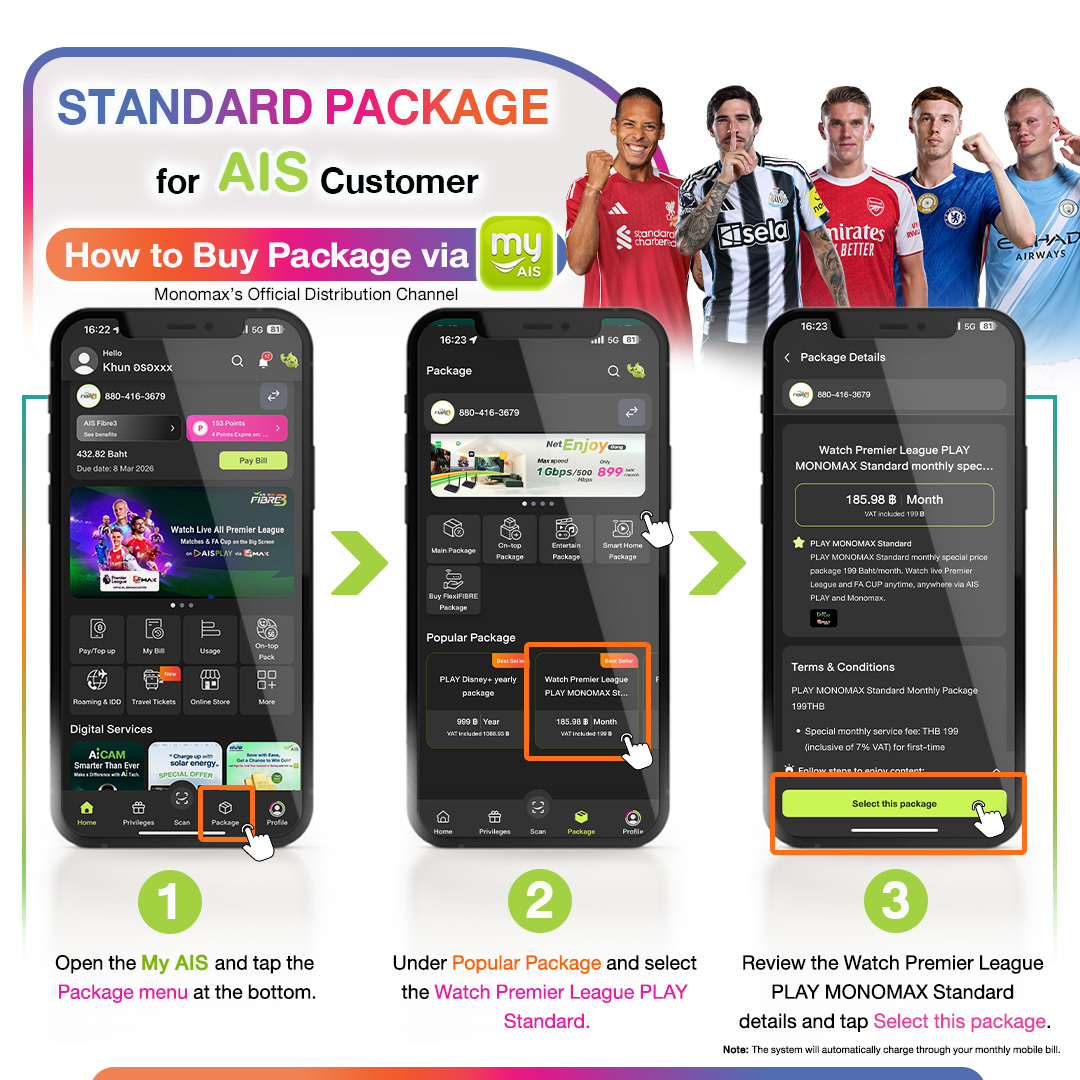
2.วิธีการซื้อแพ็กเกจสแตนดาร์ด สำหรับลูกค้า AIS ผ่านช่องทางแอปพลิเคชัน My AIS
2.1 เปิดแอปพลิเคชัน My AIS จากนั้น กด เมนูแพ็กเกจ
2.2 หน้าเมนูแพ็กเกจ ไปที่หัวข้อ "แพ็กเกจยอดนิยม" และกดเลือก "ดูพรีเมียร์ลีก แพ็กเกจ PLAY MONOMAX Standard"
2.3 อ่านรายละเอียด ดูพรีเมียร์ลีก PLAY MONOMAX Standard รายเดือน และกด "เลือกแพ็กเกจนี้" ระบบจะชำระผ่านรอบบิลโทรศัพท์อัตโนมัติ
2.How to purchase the Standard package for AIS customers through the My AIS application
2.1 Open the My AIS application, then press the package menu
2.2 On the package menu page, go to the "Popular Packages" section and select "View Premier League PLAY MONOMAX Standard Package"
2.3 Read the details of the monthly PLAY MONOMAX Standard Premier League and press "Select this package". The system will charge through the automatic phone bill cycle
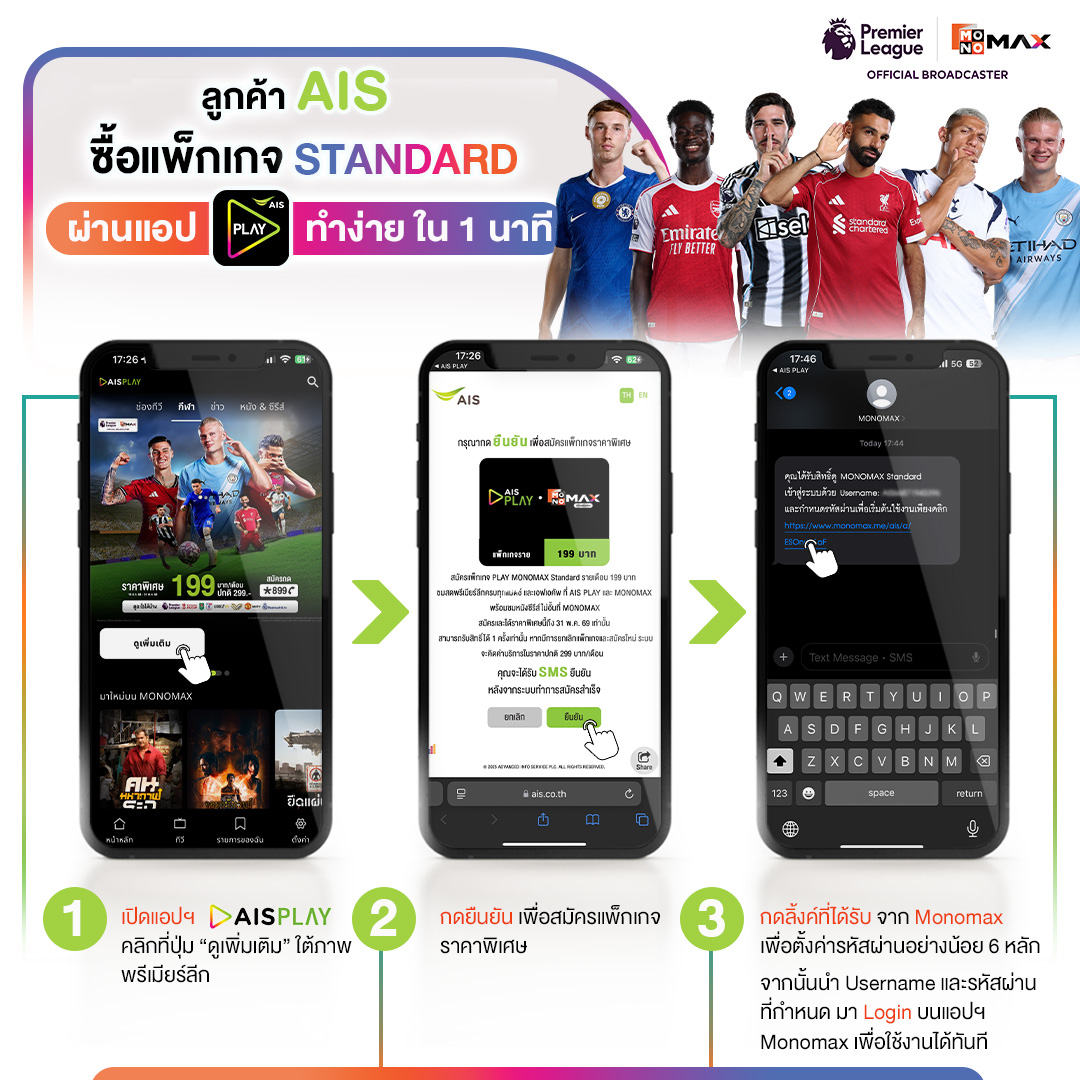
3.วิธีการซื้อแพ็กเกจสแตนดาร์ด สำหรับลูกค้า AIS ผ่านช่องทางแอปพลิเคชัน My AIS
3.1 เปิดแอปพลิเคชัน AIS PLAY คลิกที่ปุ่ม "ดูเพิ่มเติม" ใต้ภาพพรีเมียร์ลีก
3.2 กด "ยืนยัน" เพื่อสมัครแพ็กเกจราคาพิเศษ
3.3 กดลิงก์ที่ได้รับจาก Monomax เพื่อตั้งรหัสผ่านอย่างน้อย 6 หลัก
จากนั้นนำ Username และรหัสผ่านที่กำหนดนำมา Login บนแอปพลิเคชัน Monomax เพื่อใช้งาน
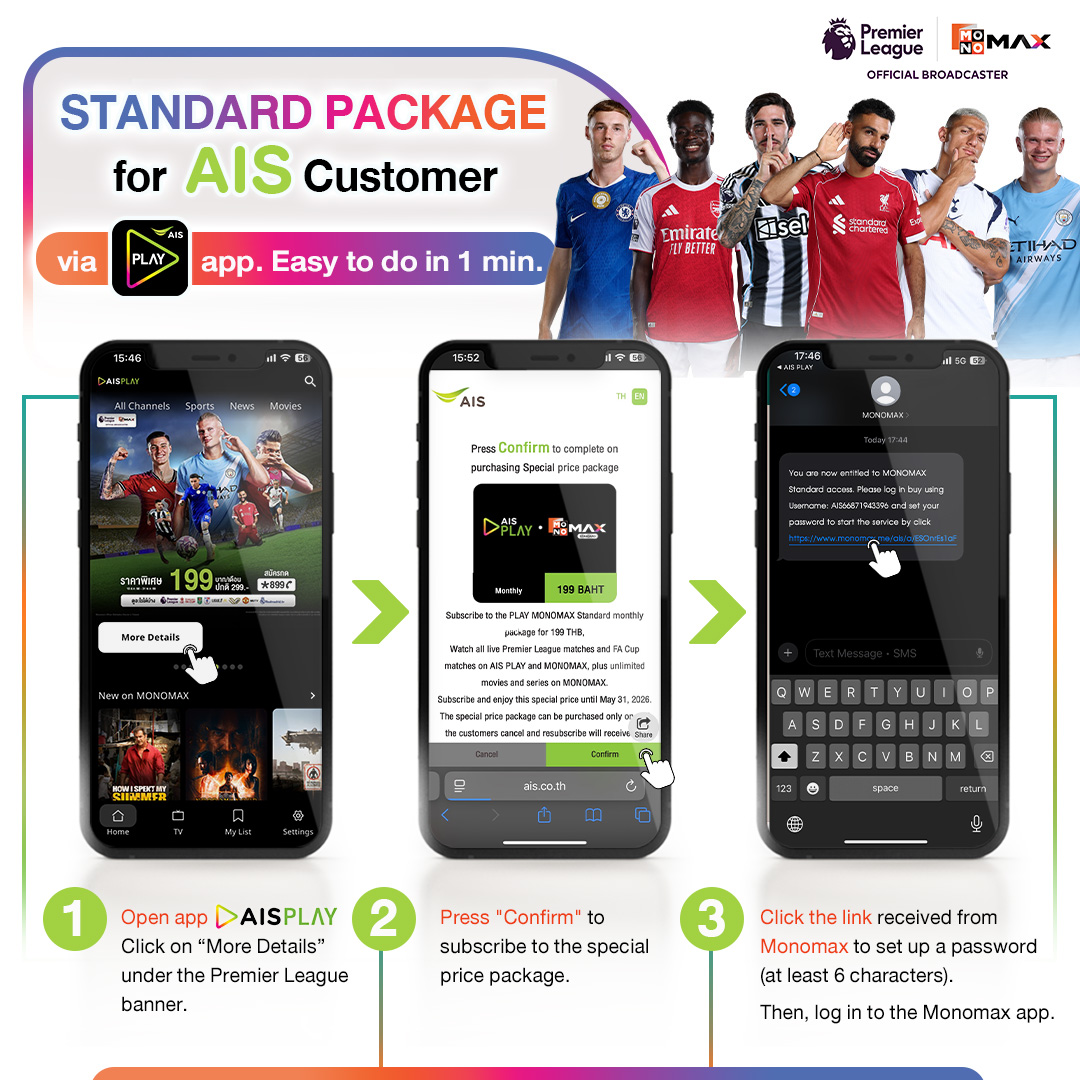
3. How to purchase the standard package for AIS customers through the My AIS application
3.1 Open the AIS PLAY application and click the "See more" button below the Premier League image
3.2 Press "Confirm" to subscribe to the special price package
3.3 Click the link received from Monomax to set a password of at least 6 characters
Then use the designated Username and password to log in to the Monomax application for use
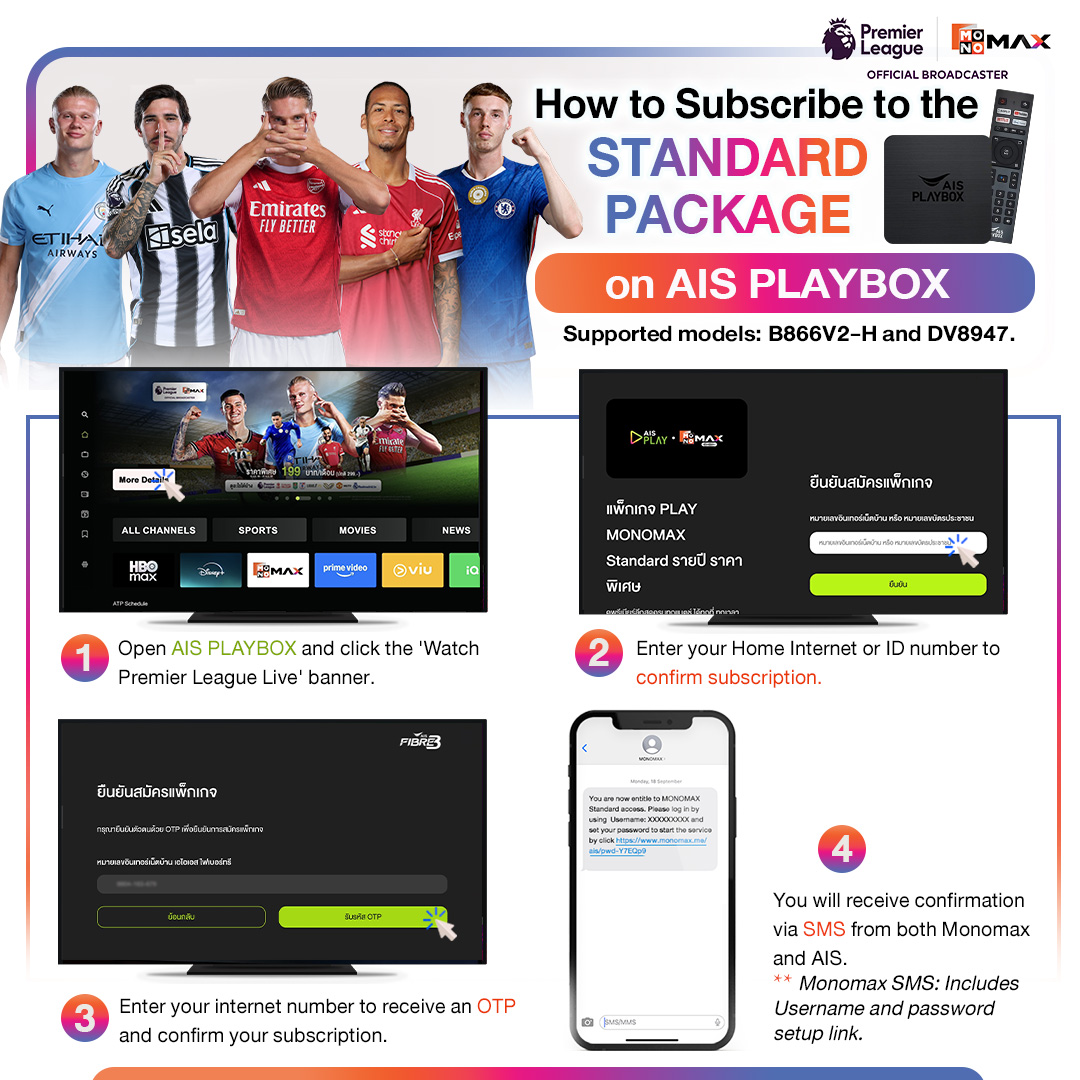
4.วิธีการซื้อแพ็กเกจสแตนดาร์ด สำหรับลูกค้า AIS ผ่านอุปกรณ์ AIS Playbox
4.1 เปิดแอปพลิเคชัน AIS Playbox คลิกที่แบนเนอร์ ดูพรีเมียร์ลีกสด ครบทุกแมตช์
4.2 กรอกหมายเลขอินเทอร์เน็ตบ้าน หรือ หมายเลขบัตรประชาชน เพื่อยืนยันการสมัคร
4.3 ระบบจะให้กรอกหมายเลขอินเทอร์เน็ตบ้าน เอไอเอสไฟเบอร์ทรี เพื่อรับ OTP และยืนยันการสมัครแพ็กเกจ
4.4 จะได้รับ SMS ยืนยัน จาก Monomax เละ AIS
*SMS จาก Monomax จะมี Username และลิงก์สำหรับตั้งค่ารหัสผ่าน
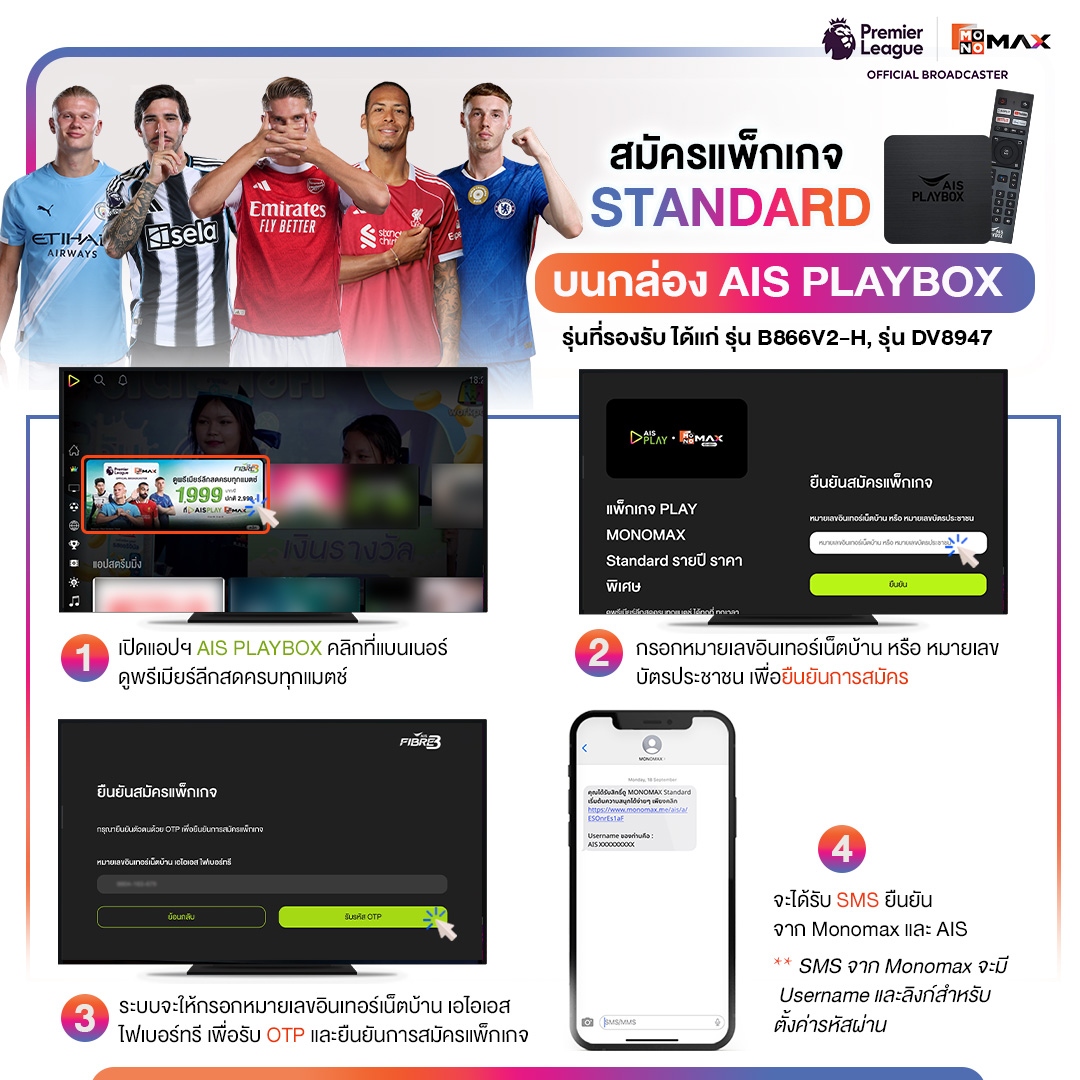
4. How to purchase the standard package for AIS customers via AIS Playbox device
4.1 Open the AIS Playbox application and click on the banner to watch the Premier League live, covering every match.
4.2 Enter your home internet number or ID card number to confirm the subscription.
4.3 The system will prompt you to enter your home internet number, AIS Fiber Tree, to receive the OTP and confirm the package subscription.
4.4 You will receive a confirmation SMS from Monomax and AIS.
*The SMS from Monomax will contain your Username and a link to set your password.
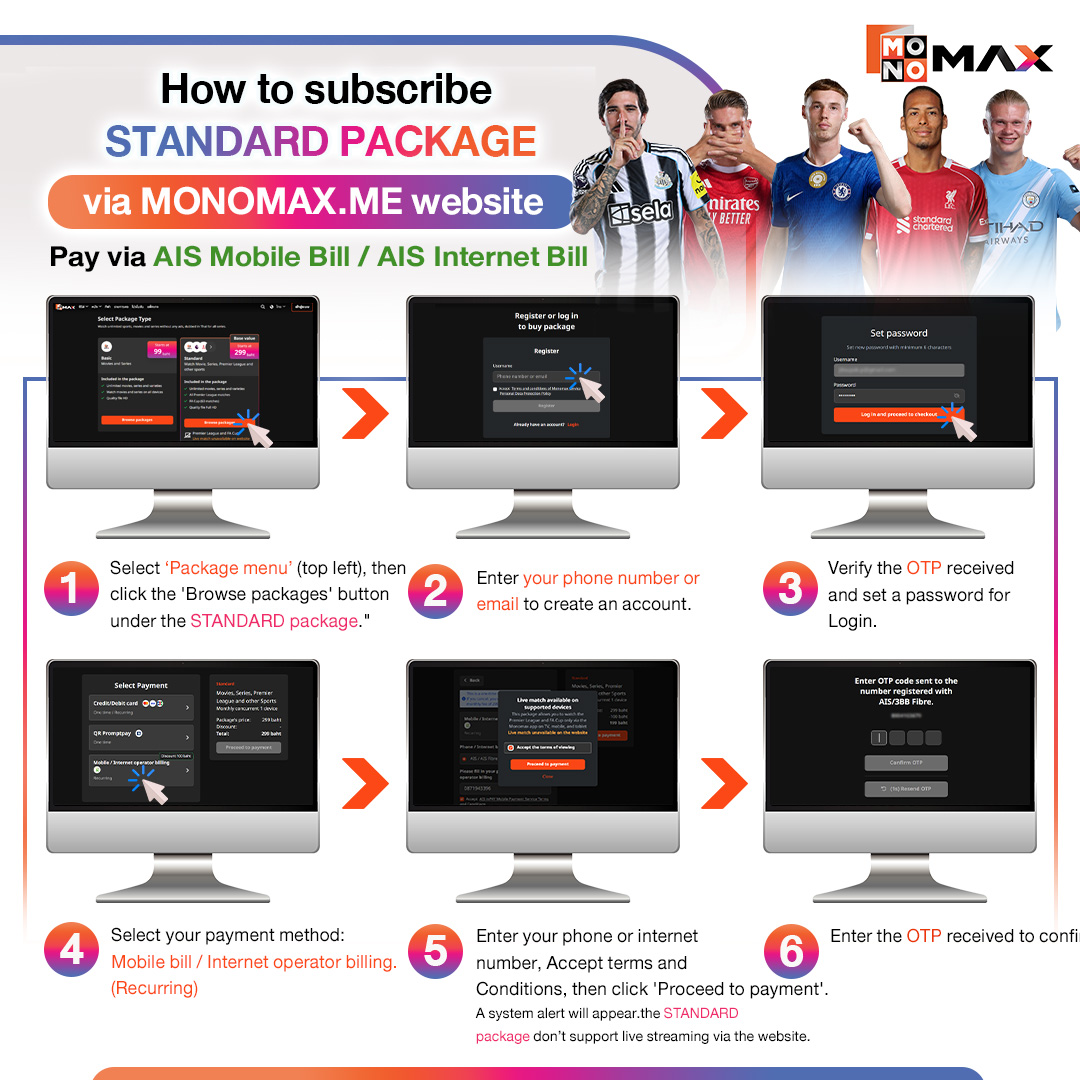
5.วิธีการซื้อแพ็กเกจสแตนดาร์ด สำหรับลูกค้า AIS ผ่านเว็บไซต์ MONOMAX.ME
5.1 กด "เลือกดูแพ็กเกจ"
5.2 กรอก "เบอร์โทรศัพท์ หรือ อีเมล" เพื่อสร้างบัญชี
5.3 ยืนยันรหัส OTP ที่ได้รับ และตั้งค่ารหัสผ่าน เพื่อใช้สำหรับ Login
5.4 เลือกช่องทางการชำระเงินด้วยวิธี บิลโทรศัพท์มือถือ /อินเทอร์เน็ต
5.5 กรอกเบอร์โทรศัพท์ /หมายเลขอินเทอร์เน็ต ติ๊ก "ยอมรับเงื่อนไข" และกดปุ่ม "ชำระเงิน"
ระบบจะเตือนแพ็กเกจ Standard ไม่รองรับการรับชมสดผ่านเว็บไซต์
5.6 ระบบจะให้กรอก หมายเลขโทรศัพท์ /หายเลขอินเทอร์เน็ต เพื่อรับ OTP และ ยืนยันการสมัคร
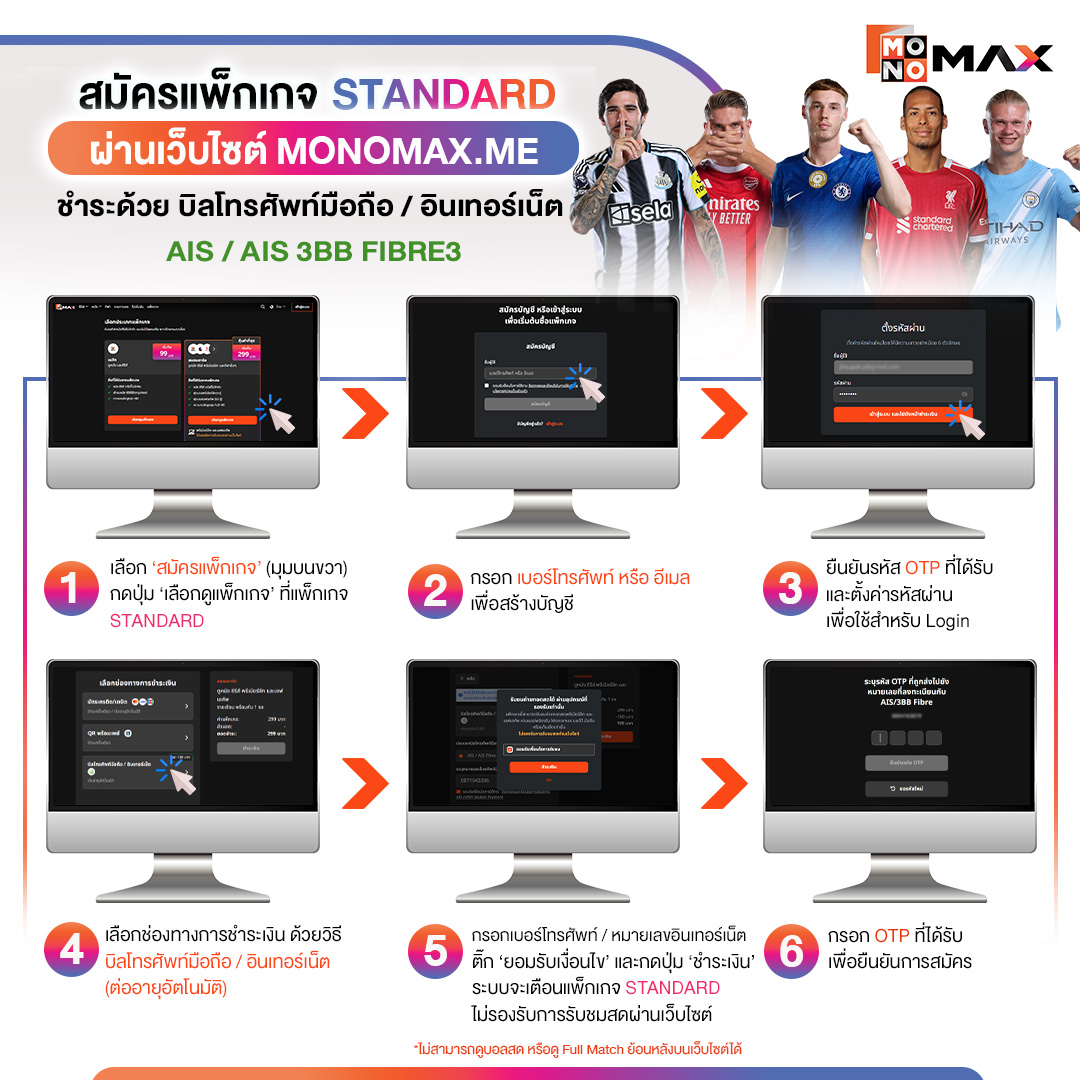
5. How to purchase the standard package for AIS customers through the website MONOMAX.ME
5.1 Click "Select Package"
5.2 Enter "Phone number or Email" to create an account
5.3 Confirm the OTP received and set a password for login
5.4 Choose the payment method via mobile phone bill / internet
5.5 Enter phone number / internet number, check "Accept Terms and Conditions" and click the "Pay" button
The system will notify that the Standard package does not support live viewing through the website
5.6 The system will ask for the phone number / internet number to receive OTP and confirm the registration
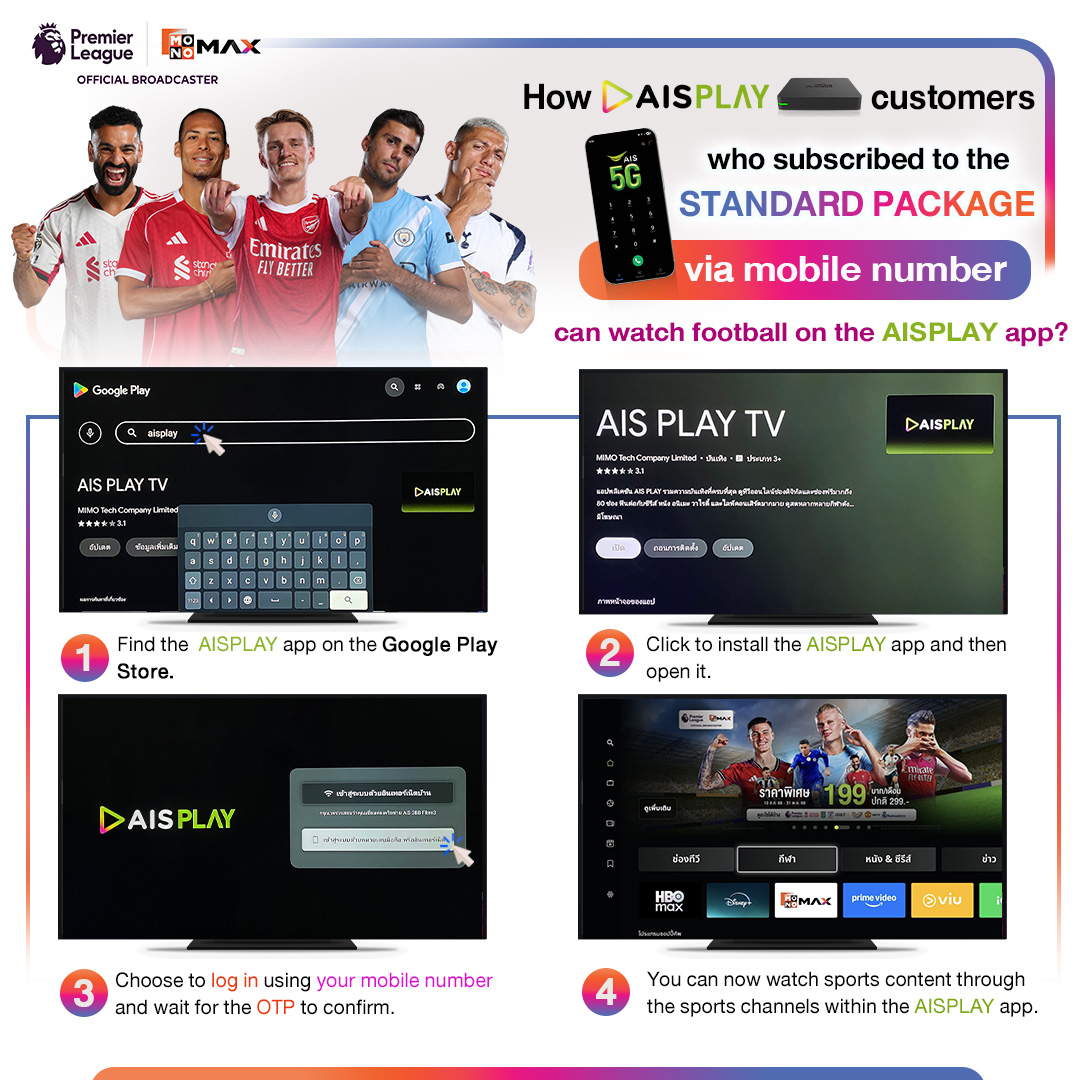
6.วิธีรับชมคอนเทนต์กีฬาผ่านแอปพลิเคชัน AISPLAY
6.1 ค้นหาแอป AISPLAY ตัวใหม่ ผ่าน Google Play
6.2 กดติดตั้งแอปพลิเคชัน AISPLAY แล้วเข้าใช้งาน
6.3 เลือกเข้าสู่ระบบด้วยเบอร์โทรศัพท์และรอรับ OTP เพื่อยืนยัน
6.4 รับชมคอนเทนต์กีฬาบนแอปพลิเคชัน AISPLAY ได้เลย
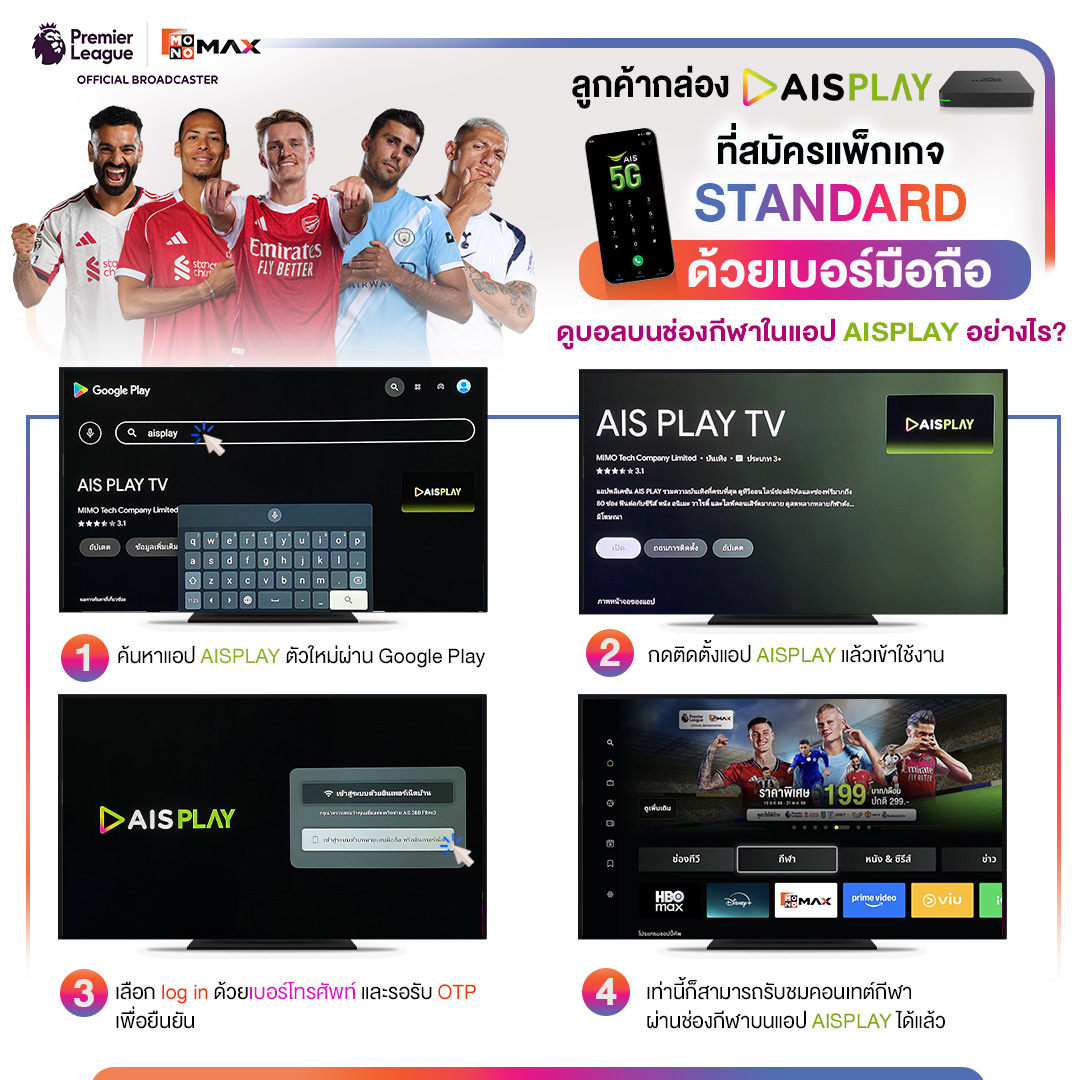
6. How to watch sports content through the AISPLAY application
6.1 Find the new AISPLAY app through Google Play
6.2 Install the AISPLAY application and log in
6.3 Choose to log in with your phone number and wait for the OTP to confirm
6.4 You can watch sports content on the AISPLAY application now