
วิธีการอัปเกรดแพ็กเกจเป็นแพ็กเกจสแตนดาร์ดสำหรับรับชมฟุตบอล (สำหรับลูกค้าเก่า)
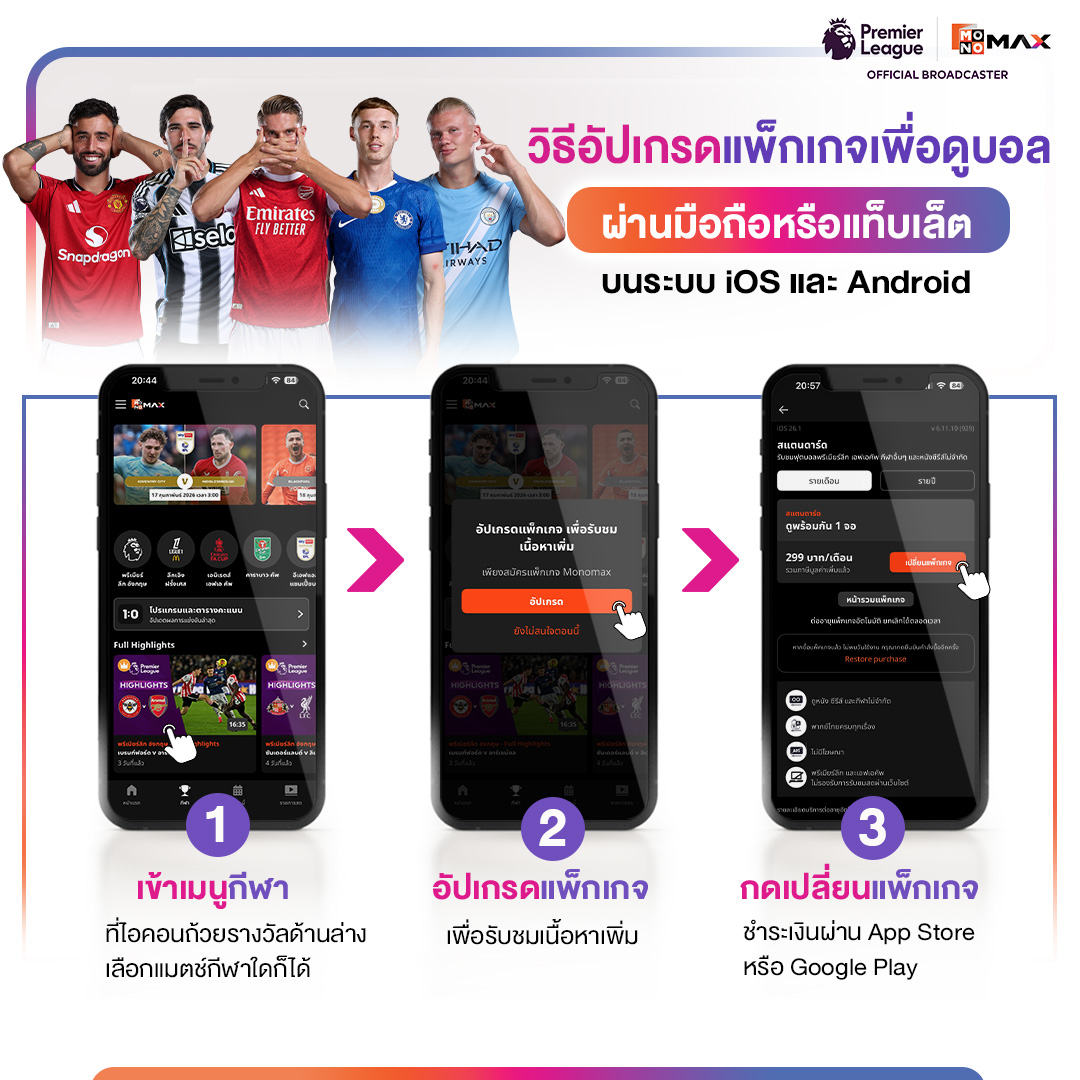
1.วิธีอัปเกรดแพ็กเกจเป็นแพ็กเกจสแตนดาร์ดเพื่อรับชมฟุตบอล
ผ่านมือถือหรือแท็บเล็ต iOS, Android
1.1 เข้าเมนูกีฬาที่ไอคอนถ้วยรางวัลด้านล่าง เลือกแมคช์ใดก็ได้
1.2 กด "อัปเกรด" เพื่อรับชมเนื้อหาเพิ่มเติม
1.3 กด "เปลี่ยนแพ็กเกจ" ชำระเงินผ่าน App Store หรือ Google Play
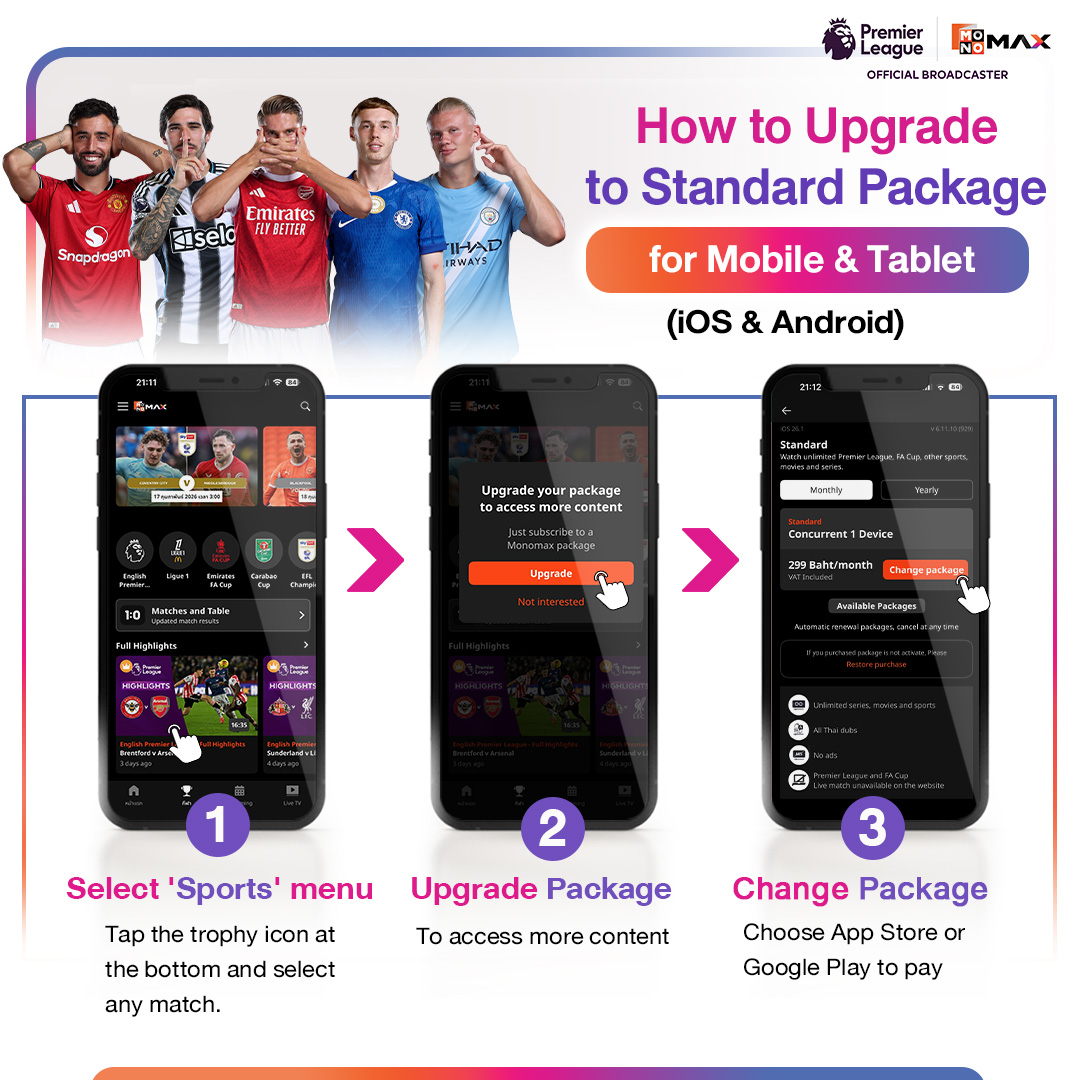
1. How to upgrade the package to the standard package to watch football
on iOS, Android mobile or tablet
1.1 Go to the sports menu at the trophy icon below and select any match.
1.2 Press "Upgrade" to access additional content
1.3 Press "Change Package" and make payment through App Store or Google Play
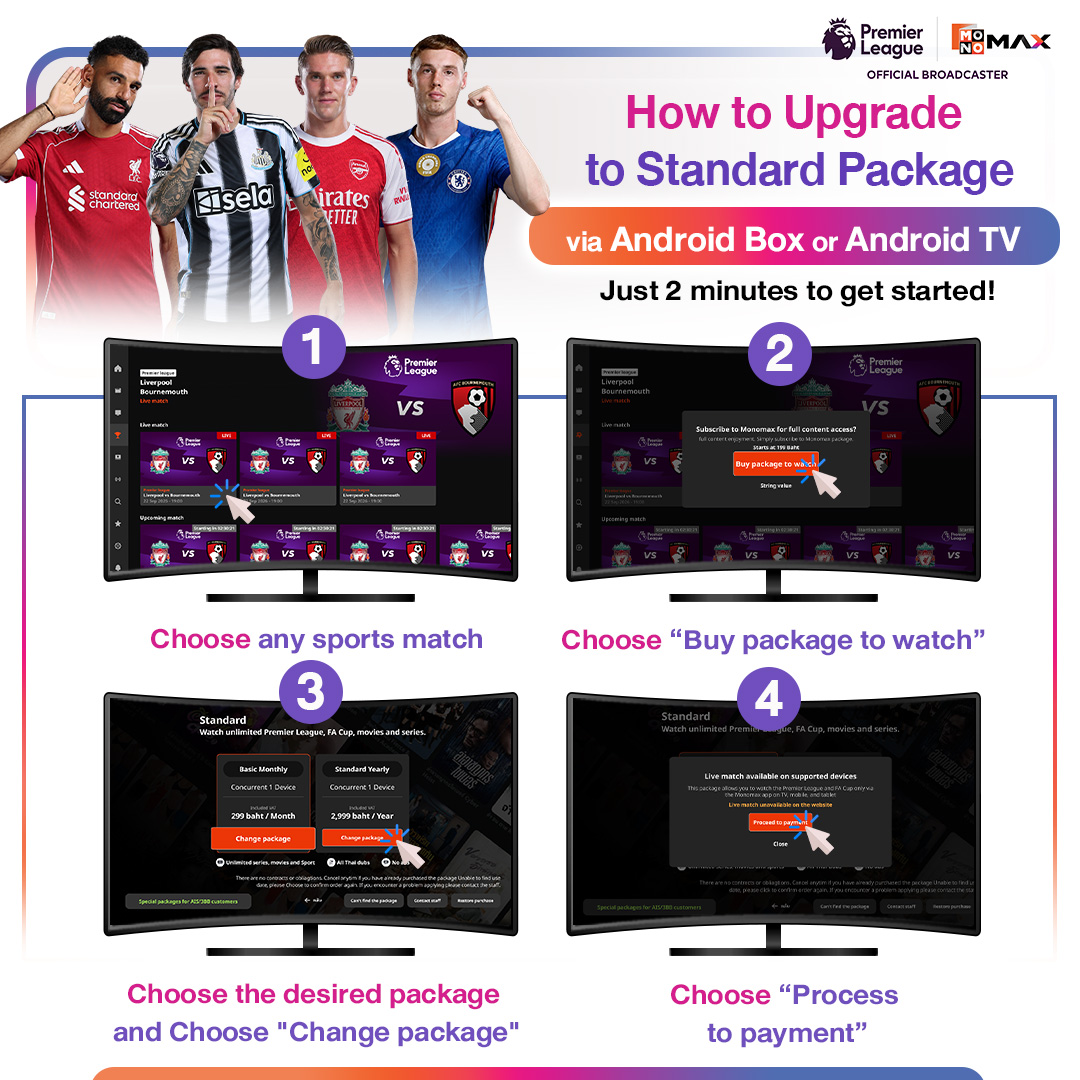
2.วิธีอัปเกรดแพ็กเกจเป็นแพ็กเกจสแตนดาร์ดเพื่อรับชมฟุตบอล
ผ่าน Android Box / Android TV
2.1 เลือกแมตช์กีฬาใดก็ได้
2.2 กด "สมัครแพ็กเกจ" เพื่อรับชม
2.3 เลือกดูแพ็กเกจที่ต้องการ และกดปุ่ม "เปลี่ยนแพ็กเกจ" (ราคานี้รวมภาษีมูลค่าเพิ่มแล้ว)
2.4 ชำระเงินผ่าน Google Play จากนั้นรับชมได้ทันที

2. How to upgrade the package to the standard package to watch football
via Android Box / Android TV
2.1 Choose any sports match
2.2 Choose "Buy package to watch"
2.3 Choose the desired package and Choose "Change package" (this price includes VAT)
2.4 Choose "Process" to payment
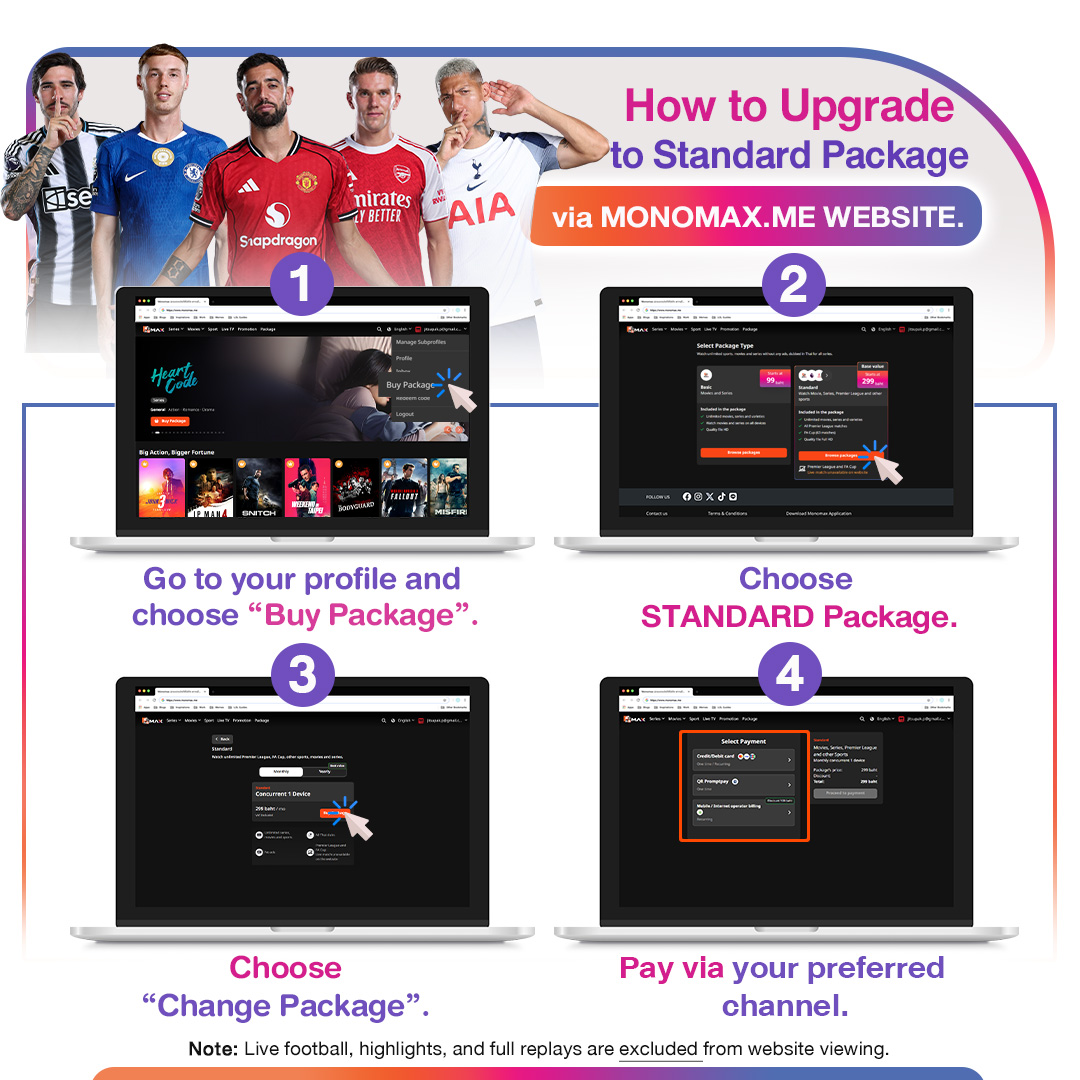
3.วิธีอัปเกรดแพ็กเกจเป็นแพ็กเกจสแตนดาร์ดเพื่อรับชมฟุตบอล
ผ่านเว็บไซต์ monomax.me
3.1 คลิกที่ "โปรไฟล์" มุมบนขวา จากนั้นเลือก “ซื้อแพ็กเกจ”
3.2 คลิก "เลือกดูแพ็กเกจ" ที่แพ็กเกจ Standard
3.3 กด "เปลี่ยนแพ็กเกจ"
3.4 เลือกช่องทางการชำระเงินที่สะดวกเพื่อรับชมแพ็กเกจ STANDARD ได้ทันที
*หมายเหตุ: ดูหนัง ซีรีส์ วาไรตี้ และไฮไลต์กีฬาได้เท่านั้น ดูสด หรือดู Full Match ย้อนหลังบนเว็บไซต์ไม่ได้

3. How to upgrade to the standard package to watch football
Through the website monomax.me
3.1 Choose on "Profile" at the top right corner, then select “Buy Package”
3.2 Choose Standard package
3.3 Press "Change Package"
3.4 Choose a convenient payment method to immediately watch the STANDARD package
4.วิธีอัปเกรดแพ็กเกจเป็นแพ็กเกจสแตนดาร์ดเพื่อรับชมฟุตบอล
ผ่านช่องทาง Smart TV (Samsung, LG)
4.1 เลือกแมตช์กีฬาใดก็ได้
4.2 กด "อัปเกรด" แพ็กเกจเพื่อรับชมเนื้อหาเพิ่มเติม
4.3 สแกน QR Code ชำระเงิน เพื่อทำการอัปเกรดแพ็กเกจ
*หมายเหตุ: LG TV รองรับ LG WebOS 4.0 ขึ้นไป และ Samsung TV รองรับ Tizen 5.5 ขึ้นไป
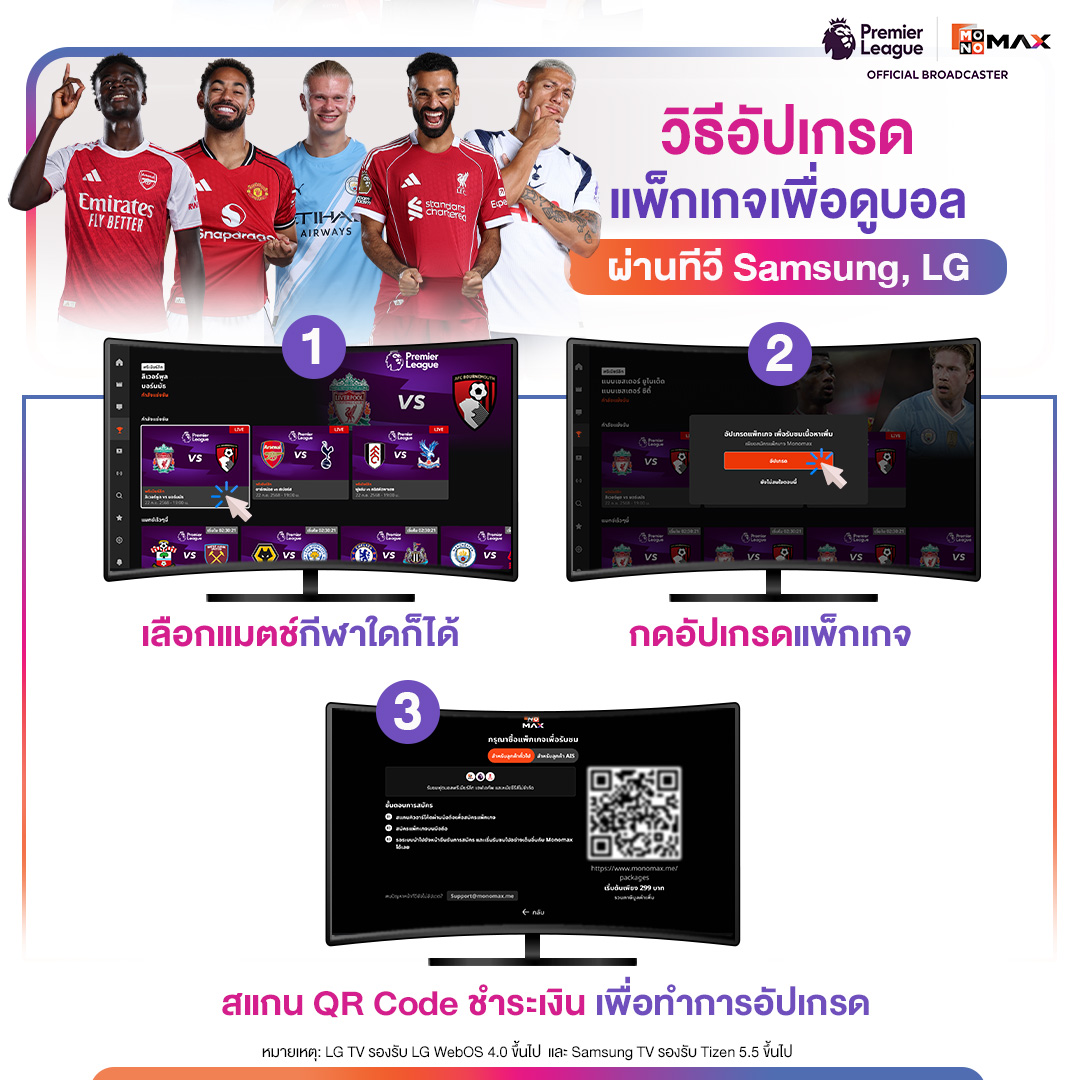
4. How to upgrade to the standard package to watch football
Via Smart TV (Samsung, LG)
4.1 Choose any sports match
4.2 Press "Upgrade" the package to access additional content
4.3 Scan the QR Code to make the payment to upgrade the package
